

In this Article
Learn how to build high-converting landing pages for Facebook ads, plus real-world Facebook ads landing page examples from successful creators.
Are you tired of seeing your hard-earned Facebook advertising budget go down the drain month after month?
Despite a decent click-through rate, conversions remain disappointing, and you’re clueless about what’s causing these lackluster numbers. My best guess? Your landing pages are losing business for you.
Facebook ad landing pages are the first step a potential customer takes toward a purchase decision. It’s your chance to create a solid impression, win their trust, and earn a sale.
But if you drop the ball with a randomly designed Facebook landing page, you’ll struggle with high bounce rates, tumbling customer trust, and a worse conversion rate.
In this guide, we’ve rounded up all the Facebook ad landing page best practices and examples to help you design well-optimized landing pages for your brand. But first, let’s look at what these pages really are and how you can benefit from one.
TL;DR
- What Facebook landing pages are (and why they matter): Standalone pages designed specifically for Facebook ads that eliminate distractions and drive conversions with a single, clear call to action
- Must-follow best practices for Facebook ad landing pages: Match your ad messaging, consider user intent, keep your ask small, and follow Facebook’s ad policies
- Mobile optimization tips: Use single-column designs, optimize images for fast load times, and create CTAs that work on smaller screens
- Real Facebook landing page examples that convert: Learn from creators like Amy Porterfield and Sommer Ray who align their ads with high-converting landing pages
What are Facebook landing pages, and why do I need them?
Facebook landing pages (also called Facebook ad landing pages) are standalone pages designed specifically for paid traffic from Facebook ads. Once your ads convince visitors to click on the CTA, these landers share more relevant details about the offer you make in that ad. You can optimize these pages to incentivize visitors to act on the CTA and maximize the conversion rate.
Let’s look at four benefits of designing a dedicated Facebook ads landing page:
No overwhelm and distractions
Let’s face it: people open the Facebook app mainly to fill time when they don’t have anything better to do. They don’t expect to spend hours at a stretch learning new information and discovering useful insights.
Given this general perspective among users to scroll leisurely, you don’t want to redirect them from an ad to your homepage. It can overwhelm them with too much information at once.
Instead, an ad landing page gives users only the most relevant information for the ad they click on. This hyper-specific page eliminates distractions, removes navigation, and retains visitors’ attention with a single, clear call to action.
Promoting your landing page on Facebook can grow your audience
Despite the raging popularity of TikTok and Instagram, Facebook continues to be a thriving community with close to 3 billion monthly active users. And given the platform’s skew to older generations, it’s a goldmine if this is your target audience.
Designing lead generation landing pages for your Facebook ads can broaden your reach and bring new audiences within your marketing funnel. The sophisticated audience targeting tools available for Facebook ads work like a cherry on top, making it easier to expand your audience on the platform with ad campaigns.
Provide potential clients with more details
Most Facebook users will either scroll past your ad or pay attention to it for a few seconds. In either case, you don’t have much time to give them all the details about your brand. Your goal should be to capture their attention with a catchy creative and convince them to click on the ad.
Then comes your landing page conveying all the information they’ll need to make a purchase decision. This lander allows you to keep your ads crisp and concise while giving interested buyers a deeper look into your product/service once they show some intent to buy.
Creating a compelling landing page drives conversions
Unlike a homepage or a product page, a Facebook landing page is designed for conversions. You structure the page, design the visuals, and write the copy to maximize the conversion rate for your CTA.
So, when users find your ads and hear about your brand for the first time, this page will give them enough information to convert them. You can design this landing page without a website and sell your content.
On the flip side, your website and other pages are designed for solution-aware leads—people who already know your brand exists and the products/services you offer. Redirecting users to any of these pages can hurt your conversion rate since you’re giving away too much information at once.
Must-dos to build an amazing Facebook ad landing page
(These best practices apply to all landing pages for Facebook ads, whether you’re generating leads, selling tickets, or promoting digital products.)
Designing a landing page for Facebook ads is no cakewalk. Since these pages convince visitors to perform a single action, every component on the page—the hero section, structure, visuals, social proof, and closing argument—is optimized for that one CTA.
But designing a landing page for Facebook ads requires more than just optimization. You have to take care of many moving parts to ensure your page performs well.
Below we’ll break down six essential tips to build an amazing Facebook ad landing page:
Ensure continuity between your ad and landing page
Most landing pages fail to resonate with the audience because they’re not properly aligned with the ad.
This mismatch happens when the ad sets certain expectations for the users, and when they click to get more information, the landing page gives them irrelevant details.
This lack of continuity between the ad and the landing page can damage your conversion rate and reputation. For example, if your ad promises to give users a content strategy template and your landing page doesn’t discuss the template, your trust value will tank, and visitors will immediately bounce.
Besides the theme of your ad, you should also think about visual consistency between the ad and the landing page. For example, let’s consider this ad by Hob. Online—dark aesthetic, product photos, and a 50% discount offer.

When you click on Shop Now, the landing page follows a similar visual theme, and it delivers on the ad’s promise of 50% off. This combination of Facebook ads and landing pages gives users a seamless and cohesive brand experience.

Consider the user intent on your Facebook landing pages
Creators can only dedicate 20% of their ad space to textual content; the rest of the ad relies on the quality of your visuals. While you’re using catchy visuals to get more eyes and clicks on your ads, pay attention to the right user intent when designing your landing pages.
Think of the emotions your ad evokes in an average user and the intent it generates for your Facebook ad landing page—commercial, navigational, informational, or transactional. Create a landing page to fulfill this intent instead of throwing something random at the visitors.
For example, this carousel ad by Shopify Plus displays snippets from its latest report. Users will click on this ad with the informational intent to gain more insights from the report.

The landing page matches the intent and gives users a direct link to download the report immediately. This dedicated page is designed to share the biggest highlights from the report and encourage visitors to grab a copy.

Paying attention to the user intent is crucial to eliminate friction from the user experience. If you’re running ads with commercial intent, your landing pages should be optimized for a buying decision.
Optimize both ads and landing pages for mobile
Most users access Facebook on their phones. But this mobile browsing trend also makes capturing your audience’s attention more challenging since they can easily get distracted and switch between apps. So, your Facebook ad landing pages have to be optimized for smaller screens.
Here are a few best practices to ensure your Facebook landing pages work well for mobile users:
- Use a CDN and optimize images to reduce your page load time
- Create single-column designs for ease of viewing on mobile screens
- A/B test your CTA buttons and make them stand out with strategic placement
- Add sticky headers and footers to let users navigate to the top/bottom effortlessly
Remember: when users access a landing page on their mobile phones, they don’t have the time to fill out lengthy forms. Stick to a few fields and make them easy to answer to deliver a frictionless user experience.
To optimize your ads, create short videos or motion graphics to add some movement to your ads. You can also design slideshow ads to catch users’ attention. Format your ads to cover the 9:16 ratio with the automatic cropping tool and leverage the complete vertical space.
Make sure your ads can create the same impact with the sound on or off since users have different audio preferences.
Keep your ask small
Choosing a simple CTA is a golden rule of thumb for designing Facebook ads landing pages. Think about it: you’re scrolling through your feed, and an ad pops up. You find it intriguing and click on it, only to find a long and endless form slapped on the page. Sounds frustrating, doesn’t it?
That’s why it’s important to think from your audience’s perspective and go for a short and simple CTA. Don’t make it feel like a chore or a long commitment. They’ll leave your page disappointed that they couldn’t find what the ad promised.
Here’s Kyla Roma’s small, sleek landing page with a single field asking for the email address. It offers her eBook in exchange for your email—quite a steal!

Add the FB Pixel for optimization
Facebook Pixel helps you track your ad performance and reveals opportunities for optimizing your landing page. It gives you targeted insights about page views, types of visitors, and similar metrics. You can use this information to tweak your ads and landers for a higher conversion rate.
You can add FB Pixel tracking code to a Kit landing page to track page views. Follow these steps:
- Go to the Settings section on the landing page editor

- Hit the SEO & Analytics option on the navigation bar on the left
- Here, you’ll find several integration options, including Facebook Pixel
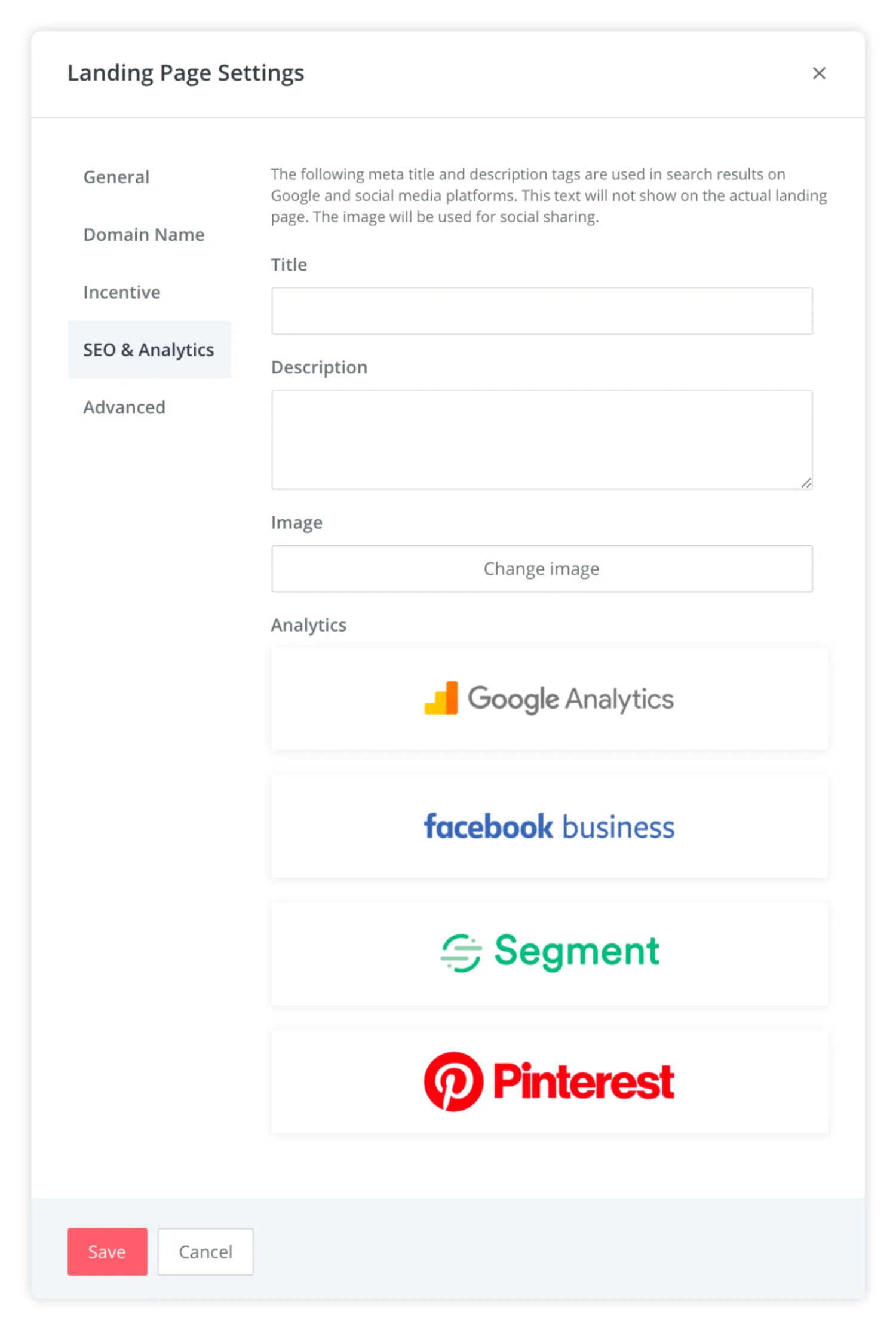
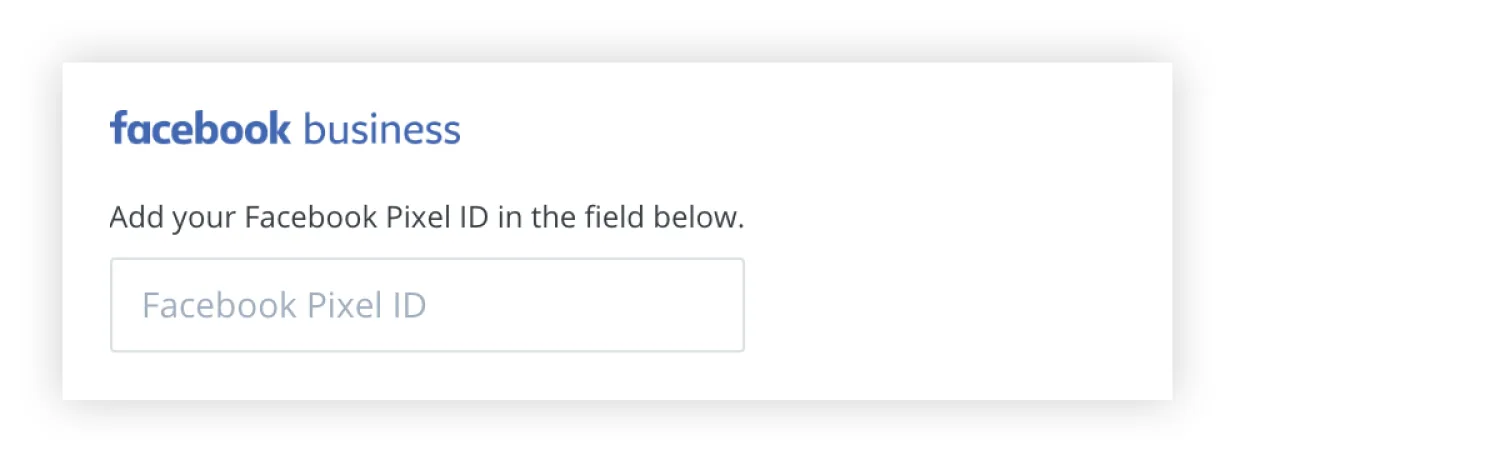
- Click on Facebook Business and add your Facebook Pixel ID to get started


Make yourself familiar with Facebook’s ad policies
Lastly, don’t forget to go through the ad policies on Facebook to ensure your ads and landing pages pass all the checks. Facebook strictly reviews and rejects ads on the platform when they violate its policies. Read Meta’s ad policies to avoid unwanted violations and run your campaigns smoothly.
Here are a few common grounds for your ads getting rejected:
- Posting overly sexual content or implying nudity
- Going against the industry-based guidelines for the ad content
- Including outdated references to Meta technologies, like an old logo
- Adding misleading buttons on a static ad to give it the look of a video
- Promoting prohibited items in the ads, like drugs, tobacco, vapes, etc.
Double-check every ad against these policies to avoid putting your efforts in vain once your campaign is live.
Facebook ad landing page checklist
Before you launch your next Facebook ad campaign, use this checklist to make sure your landing page is set up for conversions:
-
- One clear CTA per page: Give visitors a single action to take, not multiple options
- Ad message matches landing page headline: Your landing page should deliver on what your ad promises
- Mobile-first layout: Design for phones first since most Facebook users browse on mobile
- Fast page load speed: Optimize images and use a CDN to keep load times under 3 seconds
- Minimal form fields: Ask for only what you need—usually just an email address
- Clear social proof: Include testimonials, subscriber counts, or results to build trust
- No navigation links: Remove distractions that could take visitors away from your CTA
- Tracking via Facebook Pixel: Install the Pixel to measure performance and optimize your campaigns
Facebook landing page benchmarks
Once your landing page is live, track these metrics to know if it’s performing well:
- Good bounce rate: 25–40% (this means visitors stay long enough to read your offer instead of immediately leaving).
- Strong conversion rate: 5–15% (if 4–15% of visitors take your desired action, your page is doing its job).
- Mobile traffic share: 80%+ (most Facebook users browse on mobile, so expect the majority of your traffic from phones).
Not hitting these numbers? Review the checklist above and test different elements—your headline, CTA placement, or form length—to improve performance. Learn more about tracking and improving your landing page metrics here.
Common Facebook ad landing page mistakes to avoid
Even small missteps can tank your conversion rate. Here are the most common Facebook landing page mistakes creators make and how to avoid them:
- Sending traffic to your homepage: Your homepage overwhelms visitors with options. Send them to a dedicated landing page for Facebook ads that matches your ad’s specific offer.
- Slow load times on mobile: If your page takes more than 3 seconds to load, visitors will bounce. Compress images and eliminate unnecessary scripts.
- Asking for too much information: Long forms kill conversions. Stick to one or two fields—usually just an email address.
- Mismatch between ad promise and landing page: If your ad promises a free guide but your landing page talks about a course, you’ll lose trust immediately. Keep your messaging aligned.
- Missing Facebook Pixel tracking: Without the Pixel, you can’t measure performance or optimize your campaigns. Always install it before launching ads.
Real-world creator examples of landing pages for Facebook ads
Now that you know how to create landing pages for Facebook ads, let’s look at two Facebook landing page examples to inspire your own designs.
Below are real Facebook ads landing page examples that show how top creators align ads with landing pages to drive conversions. We’ll break them down to explain why they work.
Example #1 – Amy Porterfield
Amy Porterfield is a marketing expert who teaches digital marketing through her courses, podcast, and book. She runs Facebook ad campaigns to publicize her services as a marketing coach and build brand awareness.
In this ad, Amy talks about her marketing quiz that helps users find the right direction for their marketing careers.
The ad includes a graphic poster with a catchy question. The ad’s caption talks about the benefits of this quiz and gives some context about what it includes.

When you hit the Learn More button, the short landing page immediately gives you the option to take the quiz. It also offers more details about what you’ll get at the end of the 45-second quiz and highlights the main reasons you should attempt this quiz in the first place.

This Facebook ads landing page example targets users with an informational intent and delivers on their expectations. It also positions Amy as a trusted expert with ample social proof and compelling copy.
Example #2 – Sommer Ray
Sommer Ray is a famous influencer and music artist. She has millions of followers across social media channels, with 645k followers on her Facebook page.
In this ad, she’s promoting her performance at the Breakaway Music Festival, nudging users to buy tickets for the show. The ad includes a static poster of the event featuring Sommer and other details about the event. The caption is short and doesn’t sound pushy.

The landing page leads you directly to the tickets. You can see the entire artist lineup for the 2-day event and buy tickets from different options. It’s simple and aligned with the original ad.

This Facebook landing page example encourages users to buy a product. However, Sommer mainly relies on her massive influence to convince people to buy the tickets with a plain ad + lander instead of a creative and intriguing design.
A few more FB landing page FAQs
What makes a good Facebook ad landing page?
A good Facebook ad landing page has one clear goal, matches your ad’s message, loads fast on mobile, and makes it easy for visitors to take action. Keep your form fields minimal, add social proof to build trust, and remove navigation links that could distract from your CTA. The best landing pages for Facebook ads focus on serving one type of visitor with one specific offer.
Should Facebook ads send traffic to a homepage or landing page?
Always send Facebook ad traffic to a dedicated landing page, not your homepage. Your homepage is designed for people who already know your brand and want to explore multiple options. A landing page eliminates distractions and guides visitors toward a single action—whether that’s joining your email list, buying a product, or registering for an event. This focused approach can dramatically improve your conversion rate.
What is a good bounce rate for a Facebook ad landing page?
A good bounce rate for a Facebook ad landing page is anything below 40%, typically between 25-30%. This rate indicates that visitors stick by long enough to get the essential details about your brand before leaving the page. Check out this blog post to get more information on landing page metrics.
How do I add a landing page to a Facebook ad?
You can connect your Kit landing page to a Facebook ad with a few simple steps. First, create and optimize your landing page using the Kit editor. Then, prepare your ad campaign on Facebook and cover all the bases.
Once you’re ready with your landing page, click the Share button on the top toolbar and copy the custom URL. You can also customize this URL to align it with your brand.
For the next step, paste this link in the Destination field on Facebook Ad Manager and complete your campaign.
How to test landing pages before running Facebook ads?
You can test Facebook ads landing pages for these elements:
- Messaging and copy
- Visuals and structure
- Placement of social proof
- CTA design and placement
- Navigation links in the body
Is it possible to run FB ads without having a website?
Yes, you can run FB ads without having a website. The Kit landing page builder helps you create standalone landing pages for Facebook ads. It’s easy to design a customized, on-brand page with a user-friendly editor. Choose from several Facebook landing page templates to get started quickly. Don’t have an account? Sign up to get started!


